

How it works
Describe the automation in plain English — the same way you’d ask it manually. Adapt parses the schedule, confirms it back to you, and starts running it on its own.Creating an automation
Two ways in, both plain English:- From any chat — just say it. “Every Monday at 9am, summarize last week’s closed deals and post it to #sales.”
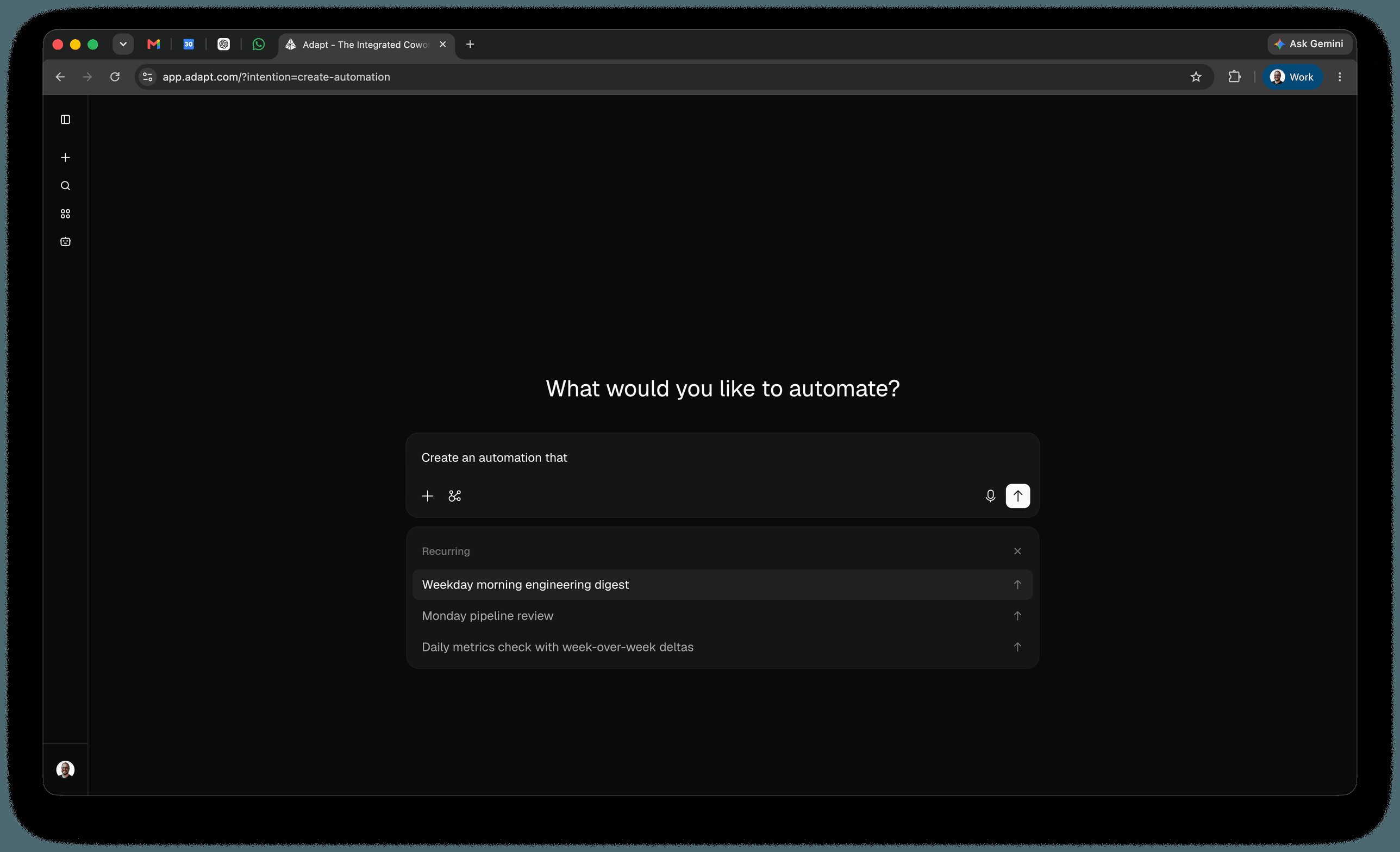
- From the Automations page — click New automation. Adapt opens a chat headed What would you like to automate? with the composer pre-filled with
Create an automation that. Finish the sentence.
Schedule types
Recurring automations
Daily, weekly, monthly, or any custom cadence. Describe it in plain language or use a cron expression.One-time automations
Schedule something to run once at a specific future moment:Event-based automations
Trigger a run from an outside system instead of the clock. Describe the trigger and Adapt creates a webhook, then gives you the URL and credentials to paste into the sending service.Connecting the sending service
Open the webhook and click Connect. The dialog gives you the credentials in whichever shape the sending service accepts:- URL secret — one ready-to-paste URL with the secret in the query string:
https://app.adapt.com/api/webhook/custom/{webhookId}?secret={secret}. Use this for services that only let you enter a URL and can’t add headers, like Grain, Resend, or Typefully. Adapt also accepts the secret in anaccess_tokenortokenparameter if the provider fixes the name. - Basic auth — the connection URL, a username, and a password as separate fields, sent as a standard HTTP Basic
Authorizationheader. Use this for callers you control: curl, scripts, or internal tooling.
Authorization header turns off the query-string secret, so a request with a bad header fails rather than falling back to the URL secret.
Rate limits and responses
Each webhook accepts a set number of requests per window — 1 request per 60 seconds by default. Change it by asking Adapt, or in the webhook’s settings.
Adapt responds as soon as it accepts the payload and runs the prompt afterward, so a
200 means the payload was received, not that the run has finished.
Cron expressions
For precise control, Adapt accepts standard 5-field cron expressions (minute hour day month weekday). The minimum interval between recurring runs is 15 minutes.
Times are interpreted in your account’s timezone.
Delivery options
Choose where results land:- Slack DM — Direct message from the Adapt bot
- Slack channel — Post to a specific channel (name the channel in your prompt)
- New chat — Results appear as a new conversation in the web app
Result delivery
Every automation also carries a result delivery setting that can send the finished result somewhere other than the channel it was created in:
Email and Messages deliver to the person who created the automation, so they’re best for automations you run for yourself. Both have prerequisites:
- Email — your account email must be verified.
- Messages — your phone must be connected under Settings > Integrations > Messaging, and you need an existing text thread with Adapt. If you delete that thread, the destination goes unavailable; text Adapt once to bring it back.
Visibility
Each automation is either private or shared:- Private — Only you can see the chats the automation creates. Useful for personal reminders, inbox triage, or anything tied to your own credentials.
- Shared — Chats created by the automation are visible to your whole organization. Useful for team standups, exec reports, or any automation whose output the team should be able to read, fork, and follow up on.
Permissions
Automations run with the same integration permissions as your account at the moment they execute. If you disconnect HubSpot or lose access to a Slack channel, any automation that depends on it will fail or skip that step on its next run. For automations the whole team relies on, schedule them from an account whose integration access is unlikely to change.Managing your automations
View your automations
See past runs
Click any automation to open its Run history — every execution Adapt has fired for that automation, with start time, title, status, and the credits that run cost. Open any row to jump into the chat Adapt produced for that run, with the full transcript, sources, and artifacts. The same page has a Details panel showing status, visibility, schedule, and creator, plus controls to edit or delete the automation. Per-run chats don’t appear in your main sidebar — only the chats you start directly do. This keeps high-frequency automations (every 15 minutes, hourly digests, overnight summaries) from drowning out your active work. Shared automation runs are visible to everyone in your org. Private automation runs are only visible to the person who created the automation.Track cost and usage
Every automation reports what it consumes, so a runaway cadence shows up before your invoice does. In the list — the Usage column shows credits consumed in the last 30 days, with the all-time total underneath. Automations that have never run read “No runs”. Sort by Top usage (30 days) or Top usage (all time) to put the heaviest spenders first. Scheduled tasks and webhooks are ranked together. On the automation — three figures sit above the run history:
Per run — the Cost column in the run history shows credits for each individual execution, so one expensive run stands out from the routine ones. Open the row to see the chat behind it. Webhook event histories show credits per delivered event the same way.
See Usage for how usage is billed.
Edit an automation
Automations aren’t write-once — change the schedule, the prompt, or the delivery target at any time. Ask in any chat, or open the automation and choose Edit, which starts a chat pre-filled withEdit automation "{name}" to for you to finish. Webhooks work the same way.
Pause or cancel
Pairing with skills and proactive Slack
Automations become much more powerful when combined with the rest of the platform:- Skills define how a recurring automation should be done — the playbook, the data sources, the format. Scheduling an automation that says “run the weekly-engaged-leads-by-source report and post it to #marketing” gives you a consistent, repeatable deliverable instead of a one-off summary that drifts in shape week over week.
- Proactive Slack mode decides when Adapt should jump in based on what’s happening in a channel. Automations decide when Adapt should jump in based on the clock. They compose well: a daily 9am rollup of overnight incidents, plus a proactive policy in
#incidentsthat wakes Adapt up the moment a new one lands.
Example use cases
Engineering
Sales
Customer success
Competitive monitoring
Exec reporting
Limits
- Minimum recurring interval: 15 minutes
- One-time delay window: 60 seconds to 7 days in the future
- Cron format: Standard 5-field expressions (minute, hour, day, month, weekday)
- Permissions: Automations run with your account’s integration access at execution time
Next steps
Slack App
Receive automation output in Slack
Skills
Turn one-off prompts into repeatable playbooks
Ask Questions
Learn how to query your data
Integrations
Connect data sources for richer scheduled output