

Get started
- Install the extension from the Chrome Web Store.
- Sign in to app.adapt.com. The extension uses the same session, so there is no separate login.
- Pin Adapt to your Chrome toolbar.
- Open a web page, select Adapt, and send a request from the side panel.
Ask about the current page
When you start a chat, the extension gives Adapt the active page’s title, URL, readable content, selected text, and interactive controls. You can ask Adapt to:- Summarize an article, document, or email thread
- Answer questions about the page
- Draft a response using the page and your connected company data
- Research a prospect while looking at their website
- Extract or compare information from a table or form
Complete browser tasks
Describe the outcome you want in plain language:
Adapt can reread the page after a click before choosing the next step.
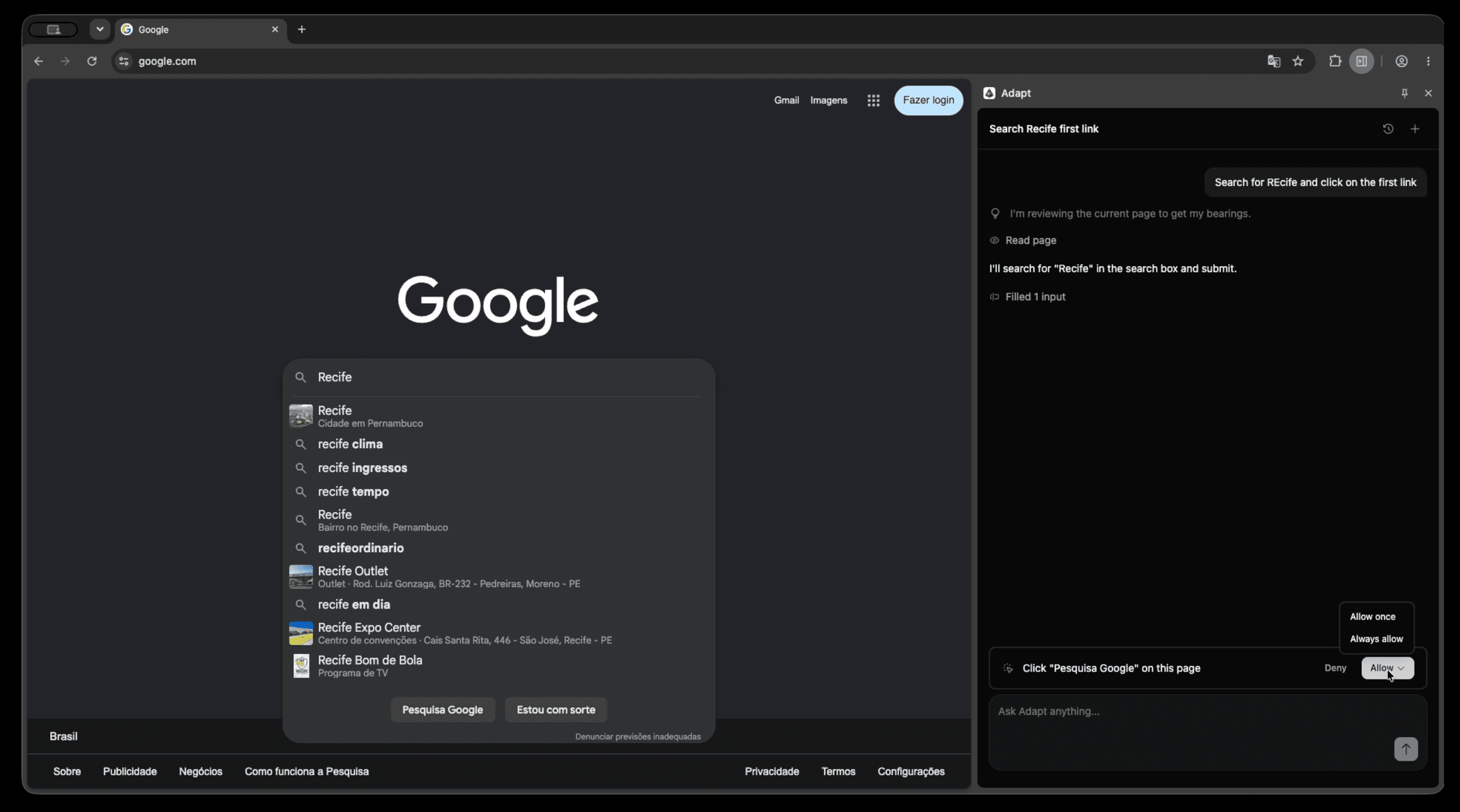
Approve browser actions
By default, clicks pause before they run. Review the action in the side panel, then choose:- Deny to stop the action
- Allow once to run it this time
- Always allow to run all future clicks automatically on that same site origin in your current browser profile
How tabs are selected
Each request is tied to the tab that was active when you sent it. Browser actions continue in that tab even if you switch tabs while Adapt is working. For reliable results:- Keep the original tab and the extension side panel open until the task finishes
- Start a new request after switching to a different tab
- Approve requested actions before the confirmation expires
Current limitations
- Browser actions are available only when you send the request from the Chrome extension with the side panel open.
- Adapt acts only on the tab pinned when the request was sent. It cannot select or move to another open tab, although the pinned tab can continue running in the background if you switch tabs.
- Chrome system pages (
chrome://), the Chrome Web Store, and some protected or non-HTML pages cannot be read or changed. - Actions target the page’s top-level standard DOM. Controls inside iframes or shadow roots may not be available.
- Form filling supports value-based inputs, text areas, selects, and content-editable fields. Checkbox and radio toggling and file uploads are not supported.
- Page reads are limited to 200,000 characters. HTML inspection returns the first five matches and is limited to 50,000 characters.
- Chrome and Chromium-based browsers are supported. A Firefox build is not published yet.