


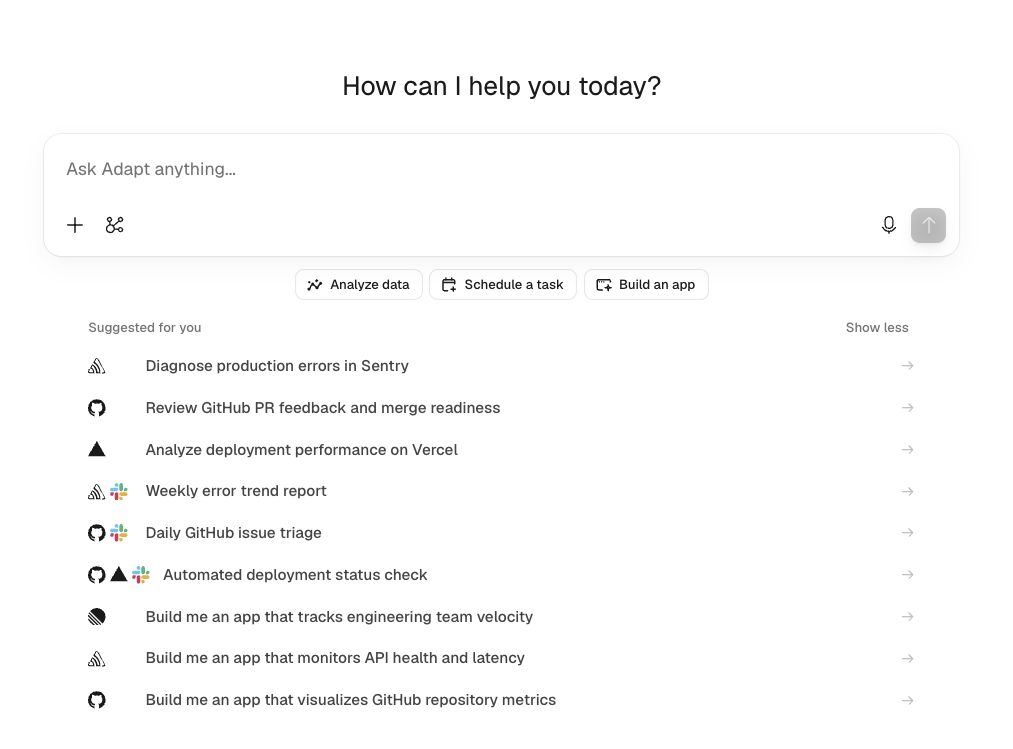
The Suggested for you list on the chat home screen is now personalized. Instead of generic starter prompts, Adapt suggests work that matches your role, reflects what your team has been doing recently, and runs on the integrations your organization and you personally have connected. Each suggestion shows the icons of the integrations it uses, so you can tell at a glance what a prompt will touch before you click it.
How it works
The first time you open Adapt, you're asked one question: What kind of work do you do? Pick your role, and Adapt generates a set of suggestions for you. You can change your role later in Settings > Account, which regenerates your suggestions.
Suggestions are grouped into three kinds of work:
- Analyze data — questions Adapt answers against your connected tools
- Schedule a task — recurring work worth turning into an automation
- Build an app — internal tools Adapt can build for you
The home screen leads with one suggestion from each group. Click a group button to see all three of its prompts, or View all to see the full set. Clicking a suggestion drops it into the composer so you can edit before sending.
What personalizes them
Adapt writes suggestions from four signals:
- Your role — the work function you selected
- Connected integrations — both your organization's connections and your personal ones, so a prompt never references a tool you can't reach. A single suggestion can chain two or three integrations when the work genuinely moves data between systems
- Recent activity — chat titles and short message snippets from the last day, widening to a week when activity is sparse
- Your organization's skills — so suggestions reflect the workflows your team has already codified
Private chats stay private. Only chats you created and chats explicitly shared with the organization feed the suggestions, and a private chat never influences anyone else's list.
Suggestions refresh at most once a day in the background, and regenerate on demand when you change your role.