


Scheduled tasks used to drop a new chat into your sidebar every time they fired. A task running every 15 minutes meant ~100 sidebar entries a day, drowning out the conversations you were actually working on.
Each run is still a real chat — Adapt still does its work in an isolated chat with full integration access and saved history. We just stopped putting them in your sidebar. Now you find them where they belong: on the task itself.
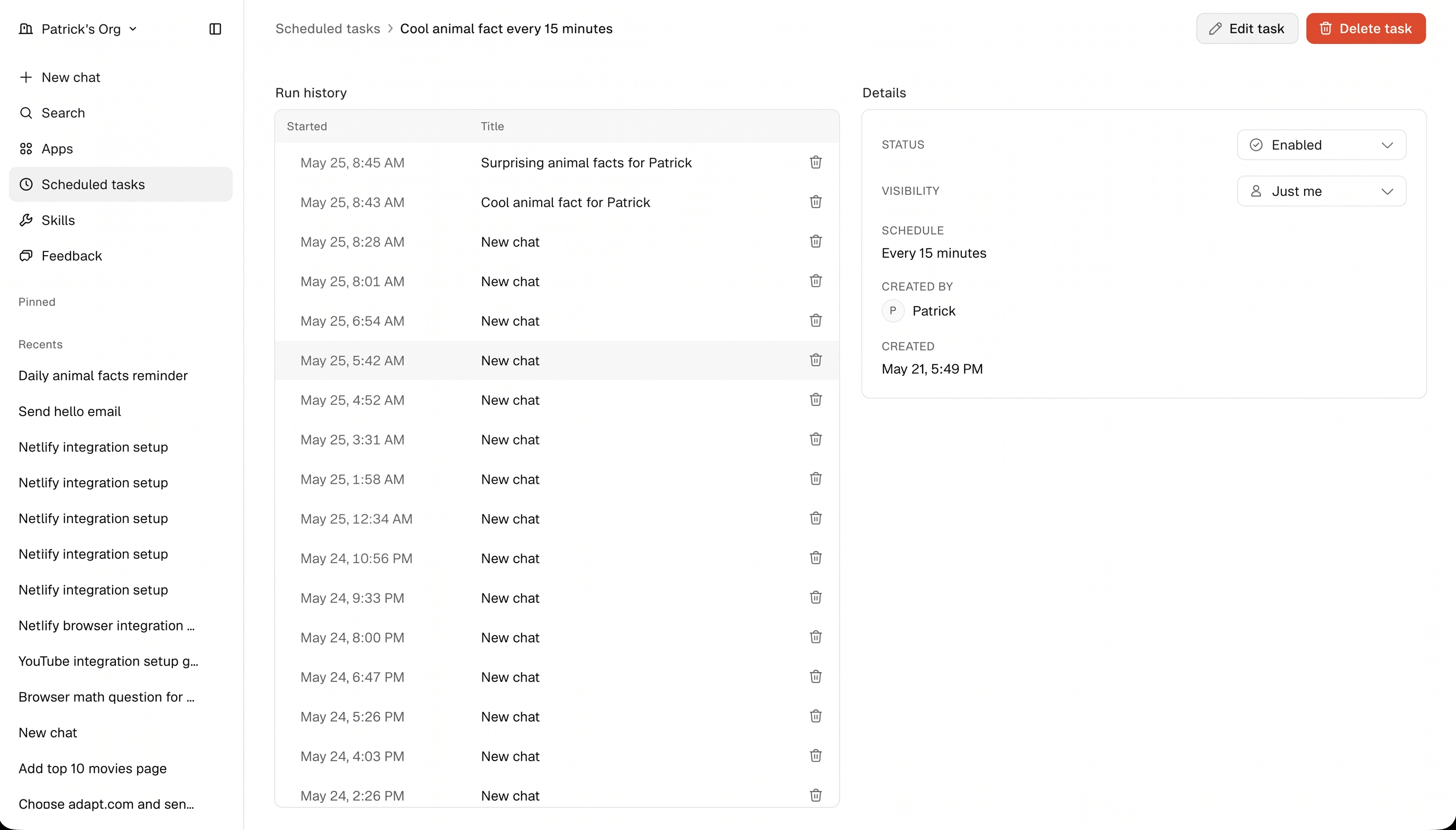
What changed
- Your sidebar no longer lists the per-run chats created by scheduled tasks. Only chats you started directly appear there, with the exception of scheduled tasks that occurred before May 27, 2026.
- The old slide-out panel on the Scheduled Tasks page is gone. Clicking a task now opens a full page for it.
- That page shows the task's full Run history — every execution, with start time, title, and a one-click link into the chat for that run.
- A Details panel on the same page surfaces status, visibility, schedule, and creator metadata, with Edit task and Delete task controls in the header.
Finding a past run
Go to Scheduled tasks in the left nav, click any task, and scan the run history. Open any row to jump into the chat Adapt produced for that run — exactly as before, with the full transcript, sources, and any artifacts it generated.
Shared task runs are visible to everyone in your org. Private task runs are only visible to the person who created the task.